Xiaolong Dictionary
<no subtitle>
# About
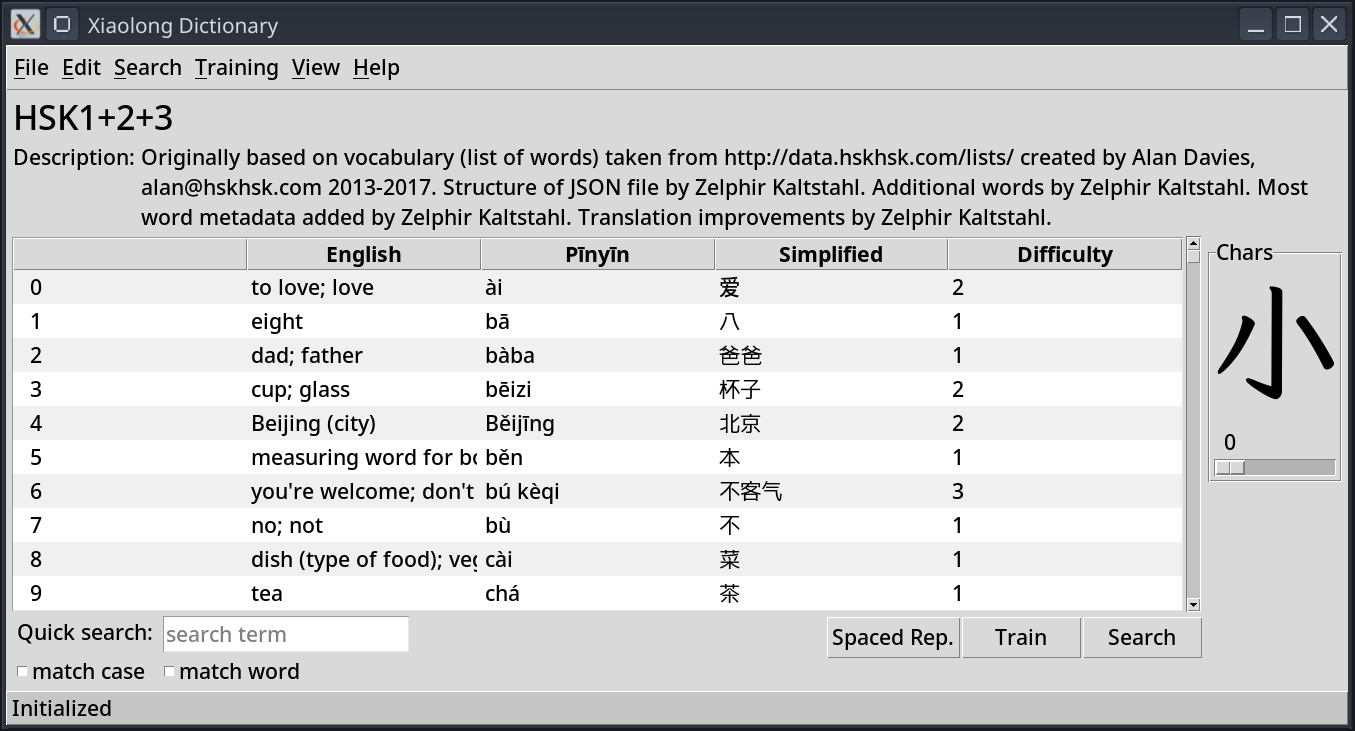
Xiaolong Dictionary (小龍词典) [1] is my take on a vocabulary learning tool. It is written in Python using plain tkinter as GUI framework/toolkit. Xiaolong Dictionary licensed AGPLv3 or later, which means it is copyleft free/libre software.
# Background
There are many out there, and some of them are even hyped to a toxic degree. [2] Vocabulary learning tool exist in all shapes, sizes, complexities. So why make another one? Well, I liked none of the ones I found and tried enough to limit myself to it ...
Like many projects, this project started with someone being annoyed by something. I consider myself a software craftsman. When I do not like the state of how things are, I keep thinking about how to make them better. For me personally, for anyone like me, or even for many other people.
# Annoyances in other Tools
So what was it that annoyed me about existing vocabulary learning tools? I will try to put a probably non-comprehensive list here. These do not all apply at once to any given tool, of course, but if one or two apply, that is enough of an annoyance, to make me think of building my own:
- Proprietary tool that locks one into a platform.
- (This is a KO criteria.)
- Cumbersome way to add words.
- I frequently add new words, so it would be good, if that was not too much work.
- Cannot version control the vocabulary.
- OK, you can still put a blob under version control, but that doesn't help much. I want to see changes, understand them, be able to correct things, avoid corruption, and all that.
- Structure or attributes of a word predefined, not suitable for the language I learn.
- I learn Mandarin, so it needs to be flexible enough to handle unicode, phonetic script, and different font sizes, so that I can see the characters properly.
- No good overview of learning progress.
- I want to be able to see my progress, as a motivation and to know, whether I am making any.
- No good way of searching in the vocabulary.
- If I want to add a word, it is important to know, that I am not adding a duplicate.
- If I know a word already exists, and I merely want to look it up quickly, it will also be helpful to be able to search for it.
- If I want to practice a specific set of words, I need to be able to get the tool to ask me about that precise set of words.
- No way to "ban" a word from appearing, when training the vocabulary.
- It is quite annoying, when a tool asks you the very beginner level words again and again, without having a way to tell it to not ask that word any longer, because you know, that even if asked next year, you will be able to recall it. I don't need to be asked "人" for a thousandth time again, thank you.
- Only runs on mobile phones.
- Mobile apps are great, but since I am a software guy, I am using mostly devices made for enabling creation of things, not just consumption. That means, I am using a proper PC or laptop.
- Hopelessly naive way of automated checking, whether I recalled a word correctly.
- There are many tools, which rely upon you defining words with their exact translation, often even only one translation. This is of course silly. No equality check will ever be sufficient to cover all meanings in all contexts or filter out any typos, or other issues. I prefer to have something, that lets me decide, whether I correctly recalled a word or not.
- And yes, this requires being honest with oneself during a training session. I have no issues with that. Often I am probably even a bit too strict in that regard.
- No way to initially classify already known words.
- Many tools will go ahead and simply have all new words start on the level of not yet learned. I want to be able to add a word, despite already knowing it well, and still not be frequently asked that word in training mode.
- No way to add arbitary attributes to the words.
- I want to be able to add lots of metadata to the words, to help my future self and others to understand the word and how it is used and facilitate better search in the vocabulary. At the very least there needs to be a good tagging system, that allows me to assign arbitrary tags, which later I can search for and get exactly the subset of words, that has these tags.
As you can see there are many reasons for me to be unsatisfied with an existing tool. My requirements for quality ar quite high, or I am very picky about my tooling and very reluctant to accept limitations for my personal workflows.
# Older Project
I actually made a tool in the past, that kind of met my needs, but I developed that in Java, using an IDE, back when I was still studying for my bachelor degree at HPI. These days I am neither a fan of Java and kingdom of nouns design, nor am I a fan of the code I wrote back then. I am sure that old project would still work, if I figured out how to get it into modern day Netbeans or so. That's the thing, when you rely on an IDE too much. You don't have an easy way to run you appliaction without the IDE setting up the whole environment and if you no longer use that IDE, then have fun figuring things out.
Xiaolong Dictionary is written in Python and would be written in GNU Guile, if I had found a mature enough GUI framework, but I did not. It has kind of the same GUI concepts though, as that older Java application, at least in its main window. I didn't need to think of that many new things for the UI.
# Other People's Projects
Of course there are many projects of other people out there, and one can't even try them all. And of course there is Anki, but it is rather cumbersome to configure, its settings are a real mess, requiring one to learn Anki specific unintuitive terminology, many of the vocabulary decks one can find are not that good, and I don't like its data format, which is some sqlite database, instead of text files, and therefore not great to handle under version control. I have to admit, that Anki has features, that I will probably never implement for Xiaolong Dictionary, but I don't need those features, so it is fine. Keep in mind, that I built Xiaolong Dictionary so that I have the perfect tool for me first, and only secondly as a tool others could use. I still think Xiaolong Dictionary is a great tool, but I guess it depends on the user and where they are on their language learning journey.
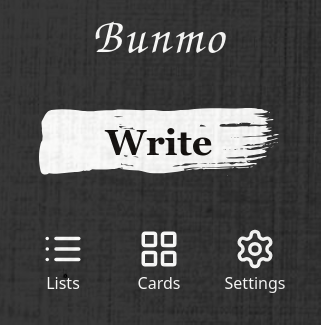
A good friend of mine also created an app for learning vocabulary. I used that for a while. Development unfortunately stalled. I didn't have the motivation of picking up the project myself, as it was not my brain child and I prefer using different technologies. His app is a progressive web app, which lets you use mouse on computer or finger on mobile phone to draw characters, and then automatically evaluates, how well you wrote the character. Really neat! I think for many people that app would be really useful. Especially for beginners, or when you are on in public transport.

The app did the following things well:
- It gives a great overview for progress of learning. I even stole one idea from it for my own tool.
- Lets the user draw characters. I don't have that in my tool. I use pen and paper for that.
- It let you select lists of words you want to practice. I believe it was also able to import new lists.
- It supported not only Chinese, but also Japanese.
- It lets the user specify, how good their writing is, when they don't agree with the automatic judgement.
- It runs on mobile phones, so people can use it on the way. I don't have a mobile phone app version of my tool.
- It lets the user actually write the characters inside the app, without being obnoxious when judging the correctness of the writing. The user has the final say.
My issues with the app were:
- Didn't allow me to "ban" words from being asked in training mode. Frequently asked me the primordial soup of characters again, when I did not practice for a week or two.
- It did have mysterious performance problems sometimes, which would cause the drawing input to lag or be low FPS. That issue disappears after finishing to write a character and switching to the next one.
- It wasn't easy to add a new word. Mainly the app is concerned with lists of words. You would have to make a new list of words or edit an existing one and import that list, instead of being able to add a single new word via the UI to an already imported list.
- One couldn't easily search in the vocabulary or filter it according to some attributes of the words.
I mostly used the app, when I was on my way to or from a language school in China, and it served me well during that time. If you need an app to use on the way, that lets you write characters right in the app, and you are primarily a mobile phone user, then this app might be good for you!
# Features
Having gone into detail about so many complaints of other existing tools, what features does my tool bring?
# Overview of Vocabulary
Right from the start, the user sees the table or tree view widget, that contains all words of the current vocabulary file.
# Quick Filter of Vocabulary
Below the table of words, there is an input field for filtering the words. In the overwhelming majority of cases when one is looking for a specific word, this quick filter is sufficient. Like most things in my tool, the quick filter is configurable, so that one can choose which attributes of words should be looked at for filtering the words. Using default settings, it will also look at tags of words, so that one can for example search for "family" and find a set of words that are tagged "family", which can include many words for relatives.
However, the quick filter is always filtering all words of the vocabulary. If one wants to search for example for "family" and then filter the result by "male" or "female", then one would have to use the advanced search.
# Searching
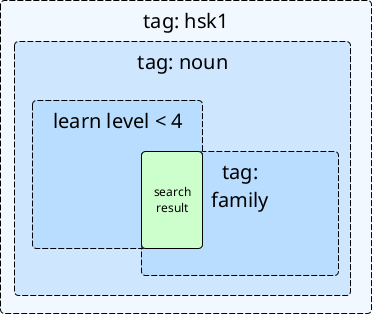
Searching in Xiaolong Dictionary is one of the core aspects. Its purpose is:
- To lookup specific words, duh. I call this the dictionary functionality.
- To get search results which then serve as basis for training vocabulary. The training mode will only consider words, that are in the search result. This helps when the user wants to practice specific vocabulary. Lets say a user notices, that they need to improve their knowledge about words for relatives or family members. Then they could search for words having the tag family. Or the user wants to strictly practice only nouns and only those that appear at the first language proficiency level of the language they learn.
- To get search results which then serve as basis for statistics and visualizations.
# Advanced Search
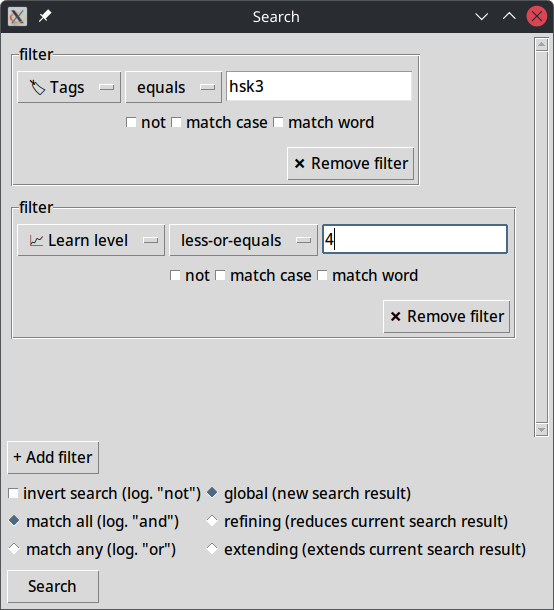
This is one of the core pieces of the tool. The advanced search allows the user to find literally any subset of words they want. It does to by allowing the user to do the following:
- specify whether the search should be performed globally, (A) on all words of the vocabulary, completely resetting the search result, (B) refining, searching only within the words, that are already in the search result, or (C) extending, searching in all words, and adding search criteria matching words to the result set of words
- logically invert a search, finding all words, where some search criteria is not met
- define any number of search criteria for each global, refining, or extending search
- specify, whether all search criteria need to be met by a word to be considered matching (logic and), or just one search criteria needs to be met (logic or)
- specify search criteria, by specifying which word attribute shall be compared with what search term, using which operation
- specifying whether any single search criteria should be inverted (logical not)
Using this advanced search function one can perform a search like in the following example:
- Search for all words of a specific language proficiency level hsk1.
- Extend the search result by all words of the language proficiency level hsk2.
- Refine the search result to only the words, that have a learn level of less than some level, say for example less than 5.
- Refine the search result to only contain words, that have the tag grammar.
- Refine further to have only the words, which do not have a difficulty greater than 3.
You can do any such query, there is no limitation.
# Saved Searches
Getting precisely the search results one wants is great, but having to perform an advanced search that has some meaningful result in ones learning context over and over again is annoying. Imagine having to click all those filters and entering the search terms again each time you start the application.
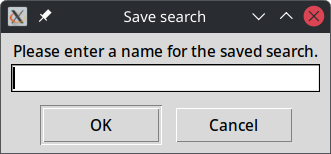
I got inspired by Thunderbird, the e-mail client. In Thunderbird one can define search queries similar to my advanced search functionality. They are not quite as powerful, as they do not allow the iterative character of extending and refining search, but the important idea is, that one can save these searches as some virtual folder. Each time one clicks on that virtual folder, Thunderbird will perform a search through ones e-mails using the saved search criteria and show the result. Of course this saves a lot of time, since one does not have to re-enter the search criteria each time.
So I have made it possible to save the last advanced search that was carried out under a name, which is then available from the search menu.
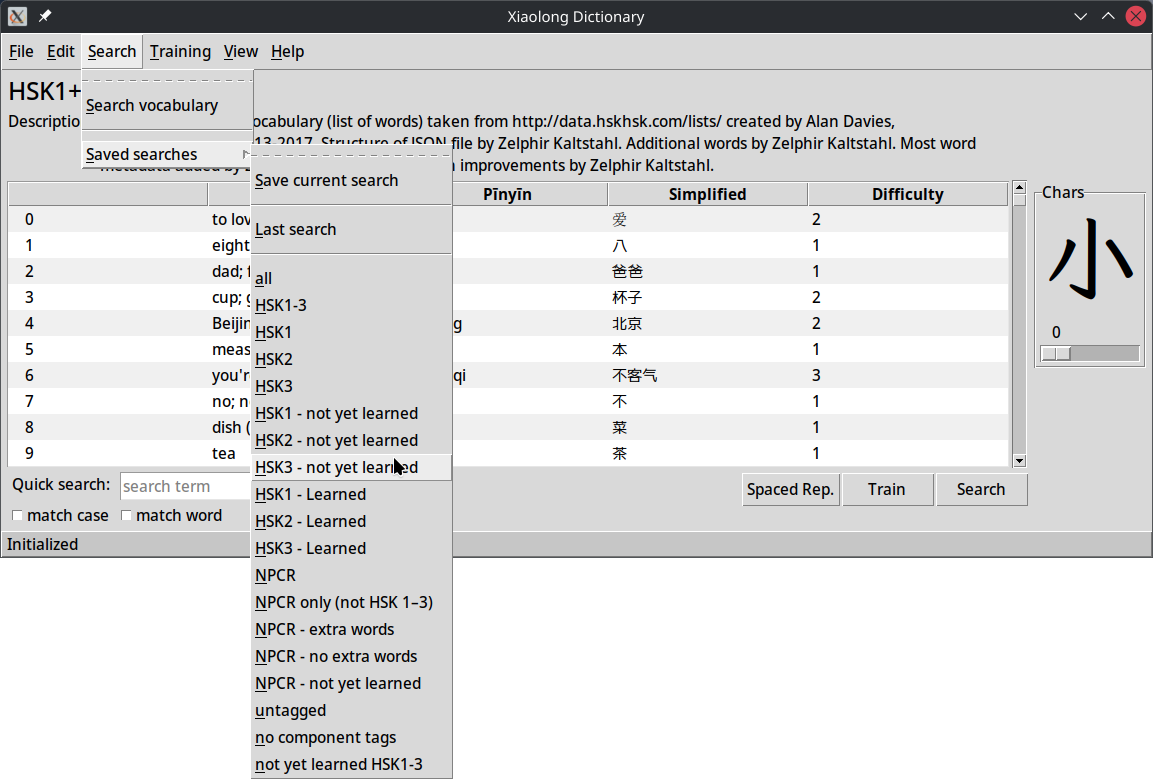
Tk also allows one to "tear off" a menu, a concept, that I have rarely seen employed in other GUI applications, but which is very useful in this context. What it does is to make that menu a separate window. This enables one to execute any saved search in 1 click on a menu item in the torn off menu.
# Quick Filter
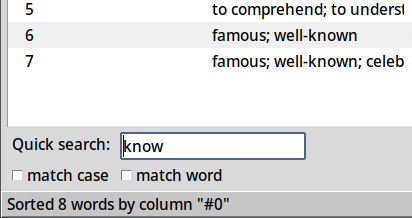
The quick filter allows to filter the words in the table in the main window. While typing the words are filtered concurrently.
Which attributes the quick filtering looks at when filtering can of course be defined in the configuration file. By default quite a few are enabled, so that the quick filtering will usually find the word right away. The quick filter works on all words of the current vocabulary and does not perform an iterative search like the advanced search allows.
# Training Mode
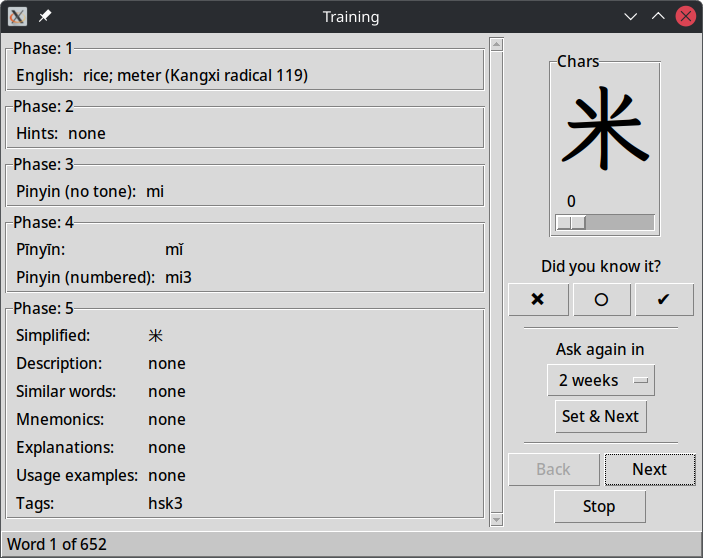
The training window is not really that special. It prompts you for the translation of a word from your vocabulary. However, it is configurable. In the configuration file of the application [3] one can define reveal phases. In each reveal phase any attributes specified for that phase are revealed. Different languages can require different attributes to be revealed at different phases of revealing, which is why I have designed Xiaolong Dictionary so that any phases of revealing can be specified in the configuration file.
Furthermore the training window also shows the big character display, so that one can look at characters in detail during training. This is of course most useful when learning languages like Chinese, and maybe Japanese, which make use of complex characters.
# Word Details
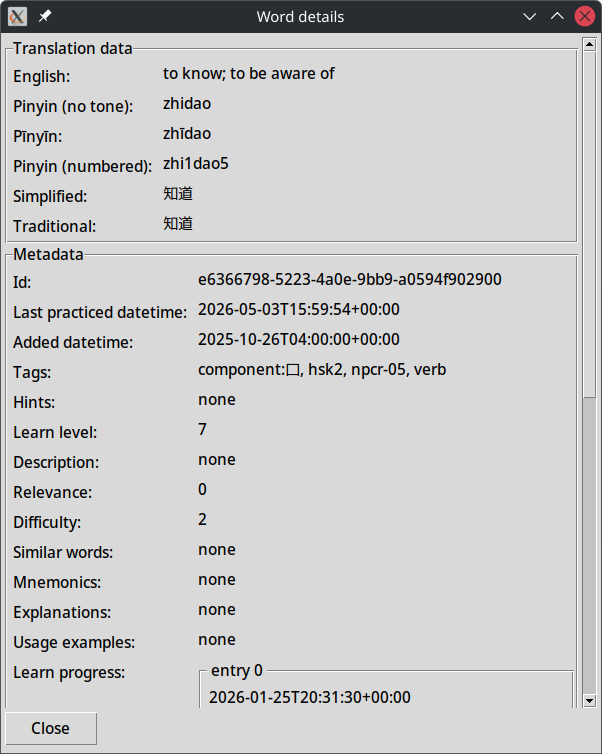
The word details window, which is accessible via the context menu of words in the main window's words table shows all attributes of a word.
# Word Editing
Words can be added via the UI and also be edited, once they have been added.
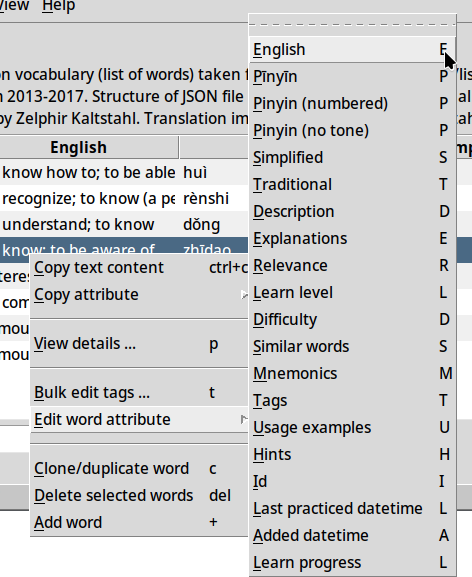
Any attribute of a word can be edited via the context menu. The context menu is generated dynamically, based on the attributes of the first word of the vocabulary file and the types of their values.
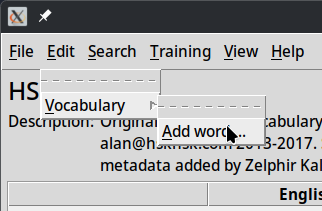
Words can of course also be added via the context menu or the main menu at the top of the main window.
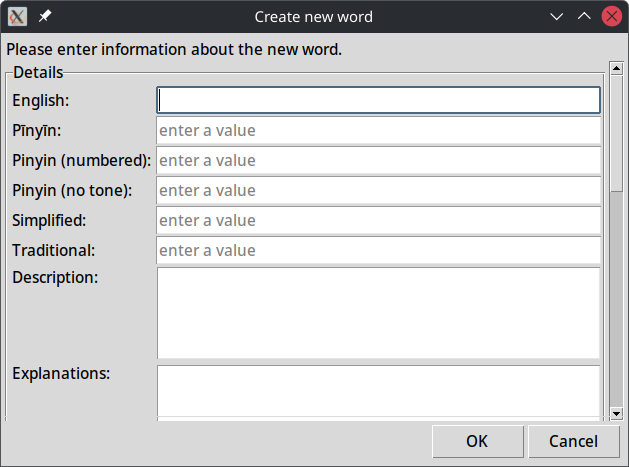
The window for adding words allows the user to enter values or multiple values for each attribute of a word.
# Tagging
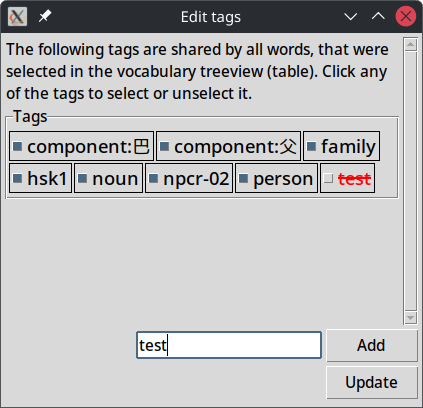
I am a big fan of tagging mechanisms in general. The ability to add tags to something for making it easy to later find it again is so valuable. I use tags for my bookmarks in Librewolf. I use tags in Thunderbird for my e-mails and sorting them. I use them for vacation photos. Whenever a good tagging functionality is available, I tend to use it. In their nature they are completely flexible. Using tags one can construct any kind of grouping of items, unlike when using hierarchies, which only allow an item to be in one branch of any given hierarchy. Naturally, I wanted to create a convenient way for me and potential other users of Xiaolong Dictionary to tag words.
Tags even allow one to define groupings, which are not foreseen by the creator of the application. For example I added tags for components of Chinese characters. Since tags can be searched in advanced search and are by default searched when quick filtering, this can enable one to find characters, that share components, or even ones which one does not remember how to write or speak, if only one knows one component. Originally, I have not forseen a need to store components as separate attributes in the metadata of a word. Encoding that information in tags is a good and practical solution, that benefits from the powerful search functionality. Who knows what other kinds of groupings someone else will come up with for the language they are learning. Tags offer a fallback solution here, if the application does not support the grouping in other ways already.
For the tagging GUI I have done something fancy. The tag widgets are custom widgets and they are inside another custom widget, that makes use of Tk's canvas widget. Tk's canvas widget allows one to not only draw on it or paint shapes, but also allows adding another widget to the canvas, as a properly working widget, not just as a graphic. I then added logic for the tag widgets to be wrapped when there is not enough space, dynamically responding on the width of the canvas. One could imagine doing that for other control widgets too, in other places of an application. The canvas widget is very powerful indeed.
Each tag widget can be toggled into enabled or diabled state, for conveniend removal or choice of tags. New tags can be added as well.
What I still want to build in some way, is a UI for seeing existing tags and choosing from existing tags, which ones to add to a set of words.
# Statistics
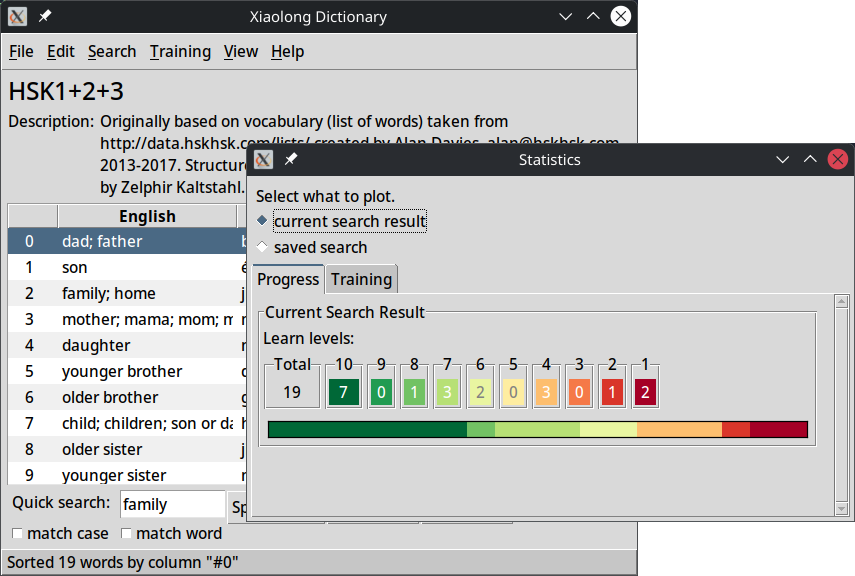
Statistics are important for a learner, to see their progress and their practicing bearing fruit.
The statistics window can show the progress and training diagrams of the current search result, benefitting from the powerful search functionality in Xiaolong Dictionary. This makes the statistics not merely available for predefined sets of words, like for example language levels, but available for any search result one has. It can answer questions like for example:
- How well do I know the words for fruit or food?
- How often do I practice words of language proficiency level N?
- How many words of language proficiency level N do I still not know well?
- Am I reaching my daily training goals?
- Does my rate of mistakes decrease over time?
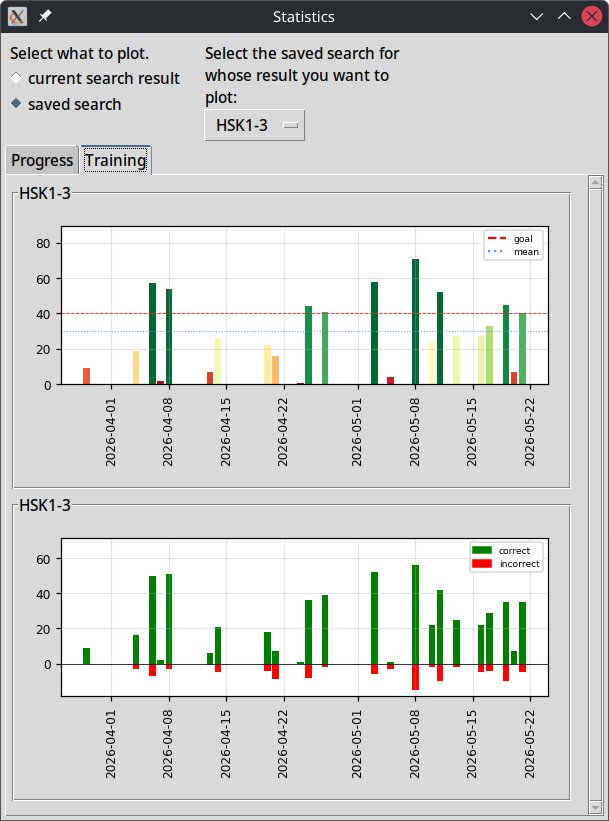
The statistics window can also show the same statistics and diagrams for any saved search. This benefits from the idea of saving advanced searches. Any implemented statistic or diagram will immediately be available for any of the saved searches. The learner could have some set of words they aim to learn, save the search that results in those words being shown as search result and then look at the diagrams to see, whether they are on track for reaching their study goal.
# Special Characters Input
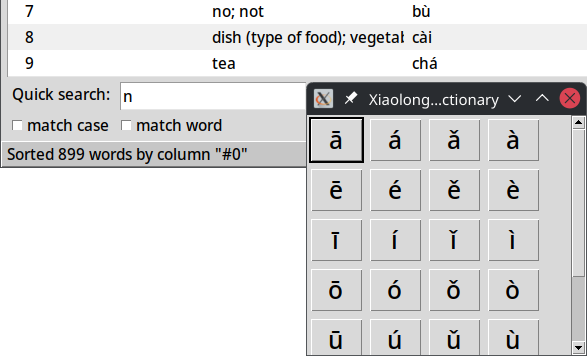
For some languages one needs to input special characters, especially, when it comes to phonetic scripts, like in Chinese the Pīnyīn. Normal users might not configure their keyboard layouts or system to be able to do that. What I have implemented in Xiaolong Dictionary is a small popup window, that can be summoned by pressing a key combination (by default ctrl+i), that shows one button for each special characters. Pressing the button will insert the special character that is the label of the button into the text input field that was focused when pressing the key combination for opening the popup. It is like a mini input method for special characters. The special characters offered in that popup window are of course configurable in the configuration file of the application, and as such can be adapted for any other language than Chinese.
# Support for other Languages
Xiaolong Dictionary can of course also be used for other languages. There is nothing about it, that couldn't be configured to fit another language.
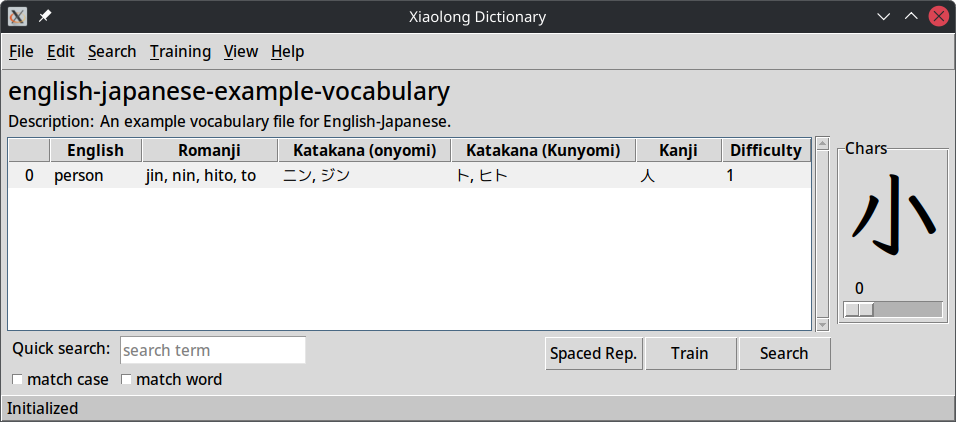
For example I have created a configuration file and vocabulary file for Japanese. Adapting the configuration for another language is not trivial yet, but it is possible without having to change the code of the application. Japanese is a poster child for a language that has many oddities. The various scripts and different types of characters, etc.. For simpler languages the adaption of the configuration is also a little bit simpler.
# Learnings
There are many things to learn from such a project. Here is a not necessarily comprehensive list.
# Learning to use tkinter
tkinter has been surprisingly easy to use and making custom widgets has been simpler than I thought at the beginning of using the framework. I am now confident, that I can build some GUIs using Tk in Python fairly quickly. Especially the tree view widget is a pleasure to use, because of how simple it is, compared to some more strictly typed alternatives in other languages and other frameworks. I still vaguely remember the time, then I tried building this kind of tool using Java and JavaFx, and had to go into research, as to what those 3 generic types are, that one needed to specify to use the tree view thingy. Using tkinter felt much simpler. Just make your things strings and display them. Have unique ids for tree view items and manage items via those ids.
While working on my tool, of course I already started using it, to test and to see, how I could improve it further. That led to me already practicing vocabulary. For example learning without seeing ones progress sucks. I stole the progress diagram idea from my friend's Bunmo app, so that I can now always see, how I am actually doing. But then I realized, that I needed to see how consistently I learned day after day (hint: not very), as a kind of motivation to become more consistent. The design of the tool is directly informed by me using it, and thinking about what would help me as a user.
# Learning more Chinese Vocabulary
Of course when testing my tool, I also already practice vocabulary. The statistics and visualizations of progress are great for me, to see my progress.
# Software Design / Synergies of well working Parts
As described above, I used search results in various parts of the application, making them a very useful and powerful mechanism. When one has a vision of how things should work and designs the parts well, one can benefit massively from the synergies between different aspects of a project. It has been a joy to reuse search results to make other functionality more powerful. Instead of following some pseudo-wise YAGNI [4] approach and not having such a powerful search, and subsequently not having saved searches, and not having words in training limited to search results, and not having statistics for any possible search result, I followed my vision, and now have all the nice features to show for it. Making one part really well truly can have unexpected benefits for other parts of a system. It takes a mindset of wanting to make something high quality though, instead of prioritizing predictability above all.
# Font for Chinese Characters
I wanted to find a good font for displaying simplified Chinese characters in the big character display in the main window and training window. Many fonts are not suitable for learners, because they are making stylistic changes to some components of characters, which would actually be wrong, if one wrote the characters that way. Some fonts do that to increase readability at small font sizes. These stylistic changes also differ from region to region. For example a Taiwan font for Chinese characters will have other stylistic changes than a Korean font for Chinese characters, and a Hong Kong font will be different from both of those, usually. I found the beautiful LxgwWenkaiGB font.
# Python Development
I have been a long time Python user, so most things are not new to me. But small insights like finding ways to make things selectively more typesafe in Python, or how to avoid heavy-weight dependencies are of course also great.
I also learned that Python's standard library's queue is thread-safe. This was instrumental in making things like search run concurrently, avoiding to block the Tk main thread. I have used concurrency many times before, but usually I prefer to use other types of concurrency constructs, that are running truly separate processes or in a OS-level thread pool. Initially I was not confident, that using Python's green threads would truly lead to a non-blocking user interface that feels good, but it turned out just fine. Probably, I am simply underestimating what a modern CPU can do again. It's probably bored searching my 900 something words.
# Screen Size
When trying to get the user's screen size or resolution, complications come up:
- What if the user uses multiple screens? Which one is the main screen? Which one does the window I want to create spawn on?
- Getting the resolution is one thing, but how does one get the physical size, for calculation of the initial size of a window?
Initially, I used some method of using tkinter to get the resolution, that I found in some Stackoverflow post. It involved making a window that is fullscreen, getting the size of that window, and then destroying it again. That's a hack. Unfortunately, it turned out, that this leads to weird behavior, or flashes on some systems, because of the OS not brining the window to the front and such things. Weird flashes and windows opening in the background is not trust inspiring, so that hack didn't live very long.
In the end I reluctantly added the library screeninfo as dependency to my project, to handle this aspect. I looked at its code on Github and it does not look like something I want to reimplement in my project.
# Ideas
I have some ideas for future development of the project:
Connect via network to other user.
Would it make sense to build some way to connect to another user, for example to have student and teacher able to connect and the teacher could then send words while teaching? Or test the student's knowledge about words, asking them some words? And then maybe the student can add those words to their vocabulary on-the-fly? Or connect to another student and gamify the training mode, letting users challenge each other in practicing vocabulary? Or maybe just connect to some server or API to download additional vocabularies? All kinds of ideas here.
Of course this would also be a learning opportunity for networking in Python. Lets not pretend that that is not one of the motivations for building such a thing in my hobby project ...
Add more convenience for editing vocabulary.
Right now one can edit any attribute of a word, but maybe it would be cool to edit things shown in the table of words in the main window directly. Only there are complications with mapping the input value back to potentially multiple values in for the attribute of the word in the vocabulary file. Also I would probably need to make a new custom input field, that hovers exactly above the value in the table, prefilled with the value from the table, that accepts input when pressing <Return> or <Enter> or performing a similar action.
Add more statistics.
I could imagine a little indicator somewhere in the main window, that changes color, depending on how consistently you practice vocabulary, or how well you know the words. Maybe some semi-clever data analysis behind it. Or some estimate, how long one will need to reach ones learning goal, at the current speed of improvement. Improvement having to be defined and calculated somehow, of course.
Importer for vocabulary from other tools
The reality is, that many people use tools like Anki. Wouldn't it be great, if they would simply import their existing vocabulary into my tool? Maybe there is already some tool, that converts Anki databases into CSV files or JSON files and I can then convert those to my tool's JSON format for vocabulary.
# Weblinks
# Footnotes
| [1] | I chose the name due to a lack of a better idea so far. Maybe I will find a better name at some point. |
| [2] | I've had people defend Anki and start fighting tooth and nail, rejecting any criticism of it, by telling me I first need to learn the terminology it uses, before using the tool, when all I wanted was to invert the translation direction for training. You see, most Anki decks you can find are in the wrong direction, or Anki asks you in the wrong direction. By default it will show you the foreign language translation and asking you to know the native language translation. That is not how you should learn vocabulary. I've had a maintainer of Anki tell me (https://news.ycombinator.com/item?id=46869166) how to find the settings to invert the direction, because even as a software developer, who is used to dealing with all kinds of shitty tools, I couldn't figure it out. However, even with them telling me, the setting could not be found based on what they wrote alone. I still had to perform guesswork in Anki settings and click around for a while in the settings, to discover it. Somehow something so very basic and essential is made way too difficult for non-technical people to ever do. Normies are not going find that setting, and they are not going to edit "Note Types" templates. |
| [3] | There is no GUI for configuring the reveal order of attributes yet. That is some future work, perhaps. |
| [4] | YAGNI is short for "You ain't gonna need it.", a typical pseudo wisdom often heard from middle management people, who think they need to micro-manage engineers. |